PlayDash bonuses are managed through a dedicated rewards area where users can activate promo codes, track Missions, earn and spend PD Coins, and follow their VIP progress. This guide examines how each reward feature works and which conditions should be checked before a bonus is used.
The focus here is specifically on promotions and rewards. Registration, MYR payment methods, casino games and sports betting are covered in separate PlayDash guides, while this page explains the mechanics behind Promo Codes, PD Coins, Bonus Shop products, Missions and the VIP Program.
The PlayDash Bonuses area acts as the main reward hub within the account. During our review, it displayed access to the Bonus Shop, Leader Board, My Progress and Bonus History, together with Missions, VIP features and a promo-code activation field.
These features do not all work in the same way. A promo code can be linked to a specific campaign, PD Coins function as reward-system units, Bonus Shop products have individual coin prices, and Missions or VIP benefits can depend on account progress.
The exact promotions available to an account can also change. Before using an offer, check its current eligibility rules, wagering requirement, eligible games, expiry and any conditions affecting the resulting reward.
PlayDash provides a dedicated field for entering promotional codes.
In the Bonuses area we reviewed, the interface displayed “Have a Promo Code?” above a field where a code could be entered and activated.
A promo-code option is also visible during account registration. The full signup process is covered on the Registration page, while this guide focuses on what happens when a promotional code is used.
The presence of a code field does not mean that every code published elsewhere will work. A code can be associated with a particular campaign, account group, acquisition channel or promotional period.
Existing users can enter an applicable code through the Bonuses area when the activation field is available.
The process is generally:
Entering a code is only the activation stage. Depending on the campaign, an additional qualifying action may still be required before the reward becomes available.
If a code is rejected, first check its validity and eligibility rather than repeatedly trying variations of the same code.
The PlayDash interface confirms that promo-code functionality exists, but the material we reviewed does not establish a permanent no-deposit promo code.
A no-deposit offer should therefore not be treated as currently available simply because users search for one.
If PlayDash runs such a campaign, the relevant conditions should be checked before activation. These may include eligibility, reward value, wagering requirements, eligible games, expiry and restrictions on converting promotional winnings.
Without a currently verified offer, we do not publish an invented code or advertise a fixed no-deposit reward.
PD Coins are reward units used within the PlayDash loyalty system. They are separate from the MYR cash balance and can be connected to achievements, promotions and special events.
| PD Coins Activity | How It Is Presented by PlayDash |
|---|---|
| Achievements | Higher achievement levels can provide larger rewards |
| Promotion Lobby | Selected promotions may include PD Coins |
| Monthly Special Events | Events and tournaments can provide opportunities to earn coins |
These are the earning methods displayed during our review. They do not establish a fixed number of coins for every achievement, promotion or event.
PlayDash lists Complete Achievements as one way to receive PD Coins.
The interface states that a higher achievement level can provide a larger reward. This means the amount can depend on the particular achievement rather than following one universal earning rate.
Check the requirement and reward attached to an achievement before attempting to complete it.
A PD Coin reward should not be treated as compensation for additional gambling losses or as a reason to exceed a normal spending limit.
The Promotion Lobby is another place where PD Coin opportunities can appear.
According to the information displayed by PlayDash, users may also receive information about special offers through email or account notifications.
PD Coin promotions can therefore be campaign-dependent. An offer available during one period or to one account should not automatically be assumed to remain available later.
PlayDash also lists Monthly Special Events as a way of earning PD Coins.
These can involve events or tournaments with their own participation requirements and reward structures.
The reference to monthly events does not mean that the same promotion, tournament or PD Coin amount repeats every month. The current event rules should be checked separately.
The Bonus Shop provides a way to exchange PD Coins for available rewards.
During our review, the shop displayed categories including free games, free spins and Sport Freebet. Each product card showed its own PD Coin cost.
| Bonus Shop Feature | What We Observed |
|---|---|
| Reward Currency | PD Coins |
| Free Games | Available in the reviewed catalogue |
| Free Spins | Available in the reviewed catalogue |
| Sport Freebet | Dedicated category visible |
| Reward Cost | Displayed individually in PD Coins |
| Availability | Depends on the current shop catalogue |
The Bonus Shop should be treated as a changing catalogue rather than a permanent reward list.
The catalogue we reviewed contained several products at different PD Coin prices.
Visible examples included 25 free games for 50 PD Coins and 50 free games for 100 PD Coins. The slot section also displayed free-spin packages, including 100 free spins for 200 PD Coins and 200 free spins for 800 PD Coins.
These figures describe what was displayed during our review rather than a permanent PlayDash price list.
Reward quantities, coin prices and available products can change, so the current Bonus Shop should be checked before exchanging PD Coins.
To use accumulated PD Coins:
A Bonus Shop product should not automatically be treated as withdrawable cash. Free spins, free games and free bets can each have separate conditions governing how the reward and resulting winnings are used.
Both Free Spins and Free Games were visible in the Bonus Shop we reviewed.
The number of spins or games is only one part of the offer. Before using a reward, check:
Detailed information about the underlying casino games belongs on the PlayDash Games page rather than this bonus guide.
A Sport Freebet category was also visible in the Bonus Shop interface.
A free bet should not be assumed to behave like an equivalent amount of ordinary MYR balance. Its conditions can specify eligible sports, markets, minimum odds, expiry and how returns are calculated.
Detailed explanations of odds and betting markets belong on the Sportsbook page. Here, Sport Freebet is relevant only as one of the reward types available through the Bonus Shop.
The PlayDash Bonuses area includes a Missions section with active campaign cards.
Missions connect specific tasks or promotional requirements with rewards. Because campaigns can change, the requirement and reward should be checked on the individual Mission rather than assumed from a previous offer.
Before participating, check what action is required, when the Mission expires and what is awarded after completion.
Completing a Mission should not require increasing a normal gambling budget simply to reach a reward threshold.
The PlayDash VIP Program uses a tiered progression system based on points. In the VIP interface we reviewed, the programme begins with Entry levels and then progresses through Bronze, Silver, Gold, Platinum, Diamond and Infinity before reaching Signature status.
Most stages contain three internal levels. The displayed starting thresholds rise considerably as the account moves through the programme.
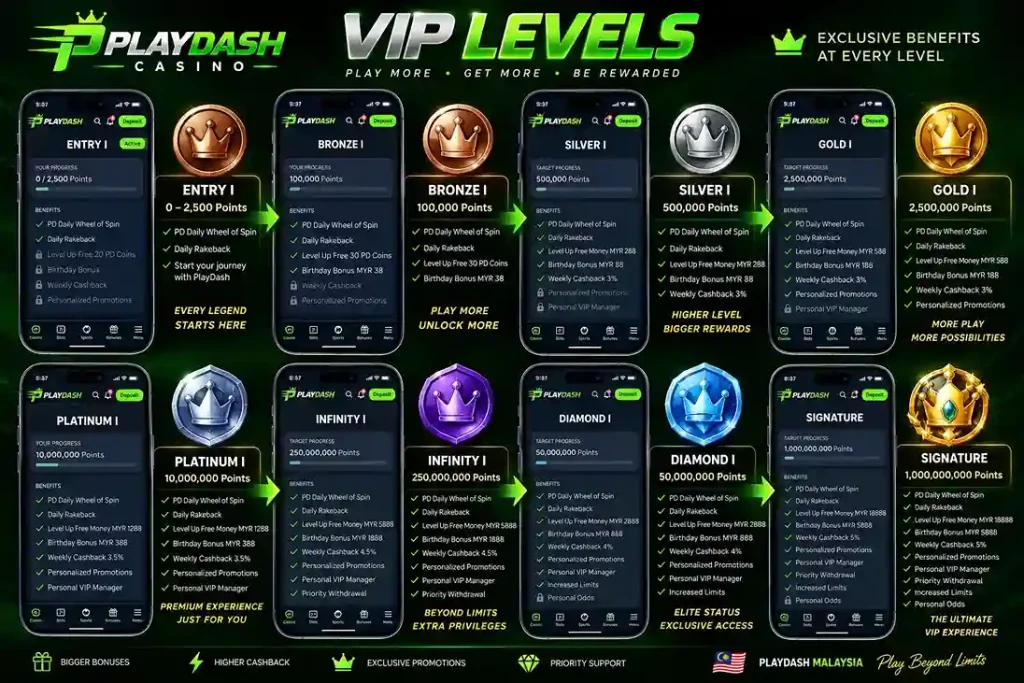
| VIP Tier | Levels | Displayed Starting Point |
|---|---|---|
| Entry | 1–3 | From 0 points |
| Bronze | 1–3 | From 100,000 points |
| Silver | 1–3 | From 500,000 points |
| Gold | 1–3 | From 2,500,000 points |
| Platinum | 1–3 | From 10,000,000 points |
| Diamond | 1–3 | From 50,000,000 points |
| Infinity | 1–3 | From 250,000,000 points |
| Signature | Highest displayed status | 1,000,000,000 points |
These figures are the progression thresholds displayed in the VIP area during our review. They are shown as points, not MYR amounts.
The progression begins at Entry from 0 points. Bronze starts from 100,000 points, followed by Silver from 500,000 and Gold from 2.5 million.
The higher stages increase more sharply: Platinum starts from 10 million points, Diamond from 50 million and Infinity from 250 million. Signature is displayed at 1 billion points.
Because most tiers contain three internal levels, the starting threshold for a tier should not be interpreted as the requirement for every level within that tier.
The information available to us also does not establish that one VIP point equals RM1 deposited, RM1 wagered or another fixed monetary amount. The actual point-calculation rules should be checked before converting these thresholds into a monetary equivalent.
The VIP interface describes the programme in connection with VIP bonuses, extended cashback and exclusive rewards.
The value of these benefits can depend on the user’s status and the current programme rules. We therefore do not assign a single cashback percentage or fixed bonus value to every VIP tier without evidence for the individual level.
| VIP Feature | What We Confirmed |
|---|---|
| Tiered Progression | Entry through Signature displayed |
| Internal Levels | Levels 1–3 shown across the main tiers |
| VIP Bonuses | Mentioned by PlayDash |
| Extended Cashback | Mentioned by PlayDash |
| Exclusive Rewards | Mentioned by PlayDash |
| Fixed Cashback Percentage | Not confirmed for all levels |
| Point-to-MYR Conversion | No fixed conversion confirmed |
The My Progress section can be used alongside the VIP system to follow reward progress within the account.
A higher VIP tier does not change the underlying financial risk of gambling. Users should not increase deposits or betting activity simply to reach the next points threshold.
The rewards interface also contains Leader Board and My Progress shortcuts.
My Progress is particularly relevant to systems based on achievements and VIP progression because it provides an account area for following reward-related progress.
Leader Board provides access to ranking-related features where an applicable event or campaign is active.
Scoring and qualification should be taken from the rules of the current event rather than assumed to work the same way across all PlayDash promotions.
Bonus History provides a separate area for reviewing bonus-related activity.
This can help when checking whether a reward was activated or reviewing previous promotional activity.
If an expected bonus does not appear as ordinary account balance, Bonus History is one of the first places to check before assuming that activation failed.
The headline reward does not explain the full value or restrictions of a promotion. Its terms determine how the offer can actually be used.
| Term | Why It Matters |
|---|---|
| Eligibility | Determines which accounts can use the promotion |
| Qualifying Action | Defines what must be completed to receive the reward |
| Wagering Requirement | Shows whether qualifying value must be wagered |
| Eligible Games | Games may be included, excluded or weighted differently |
| Expiry | Determines how long the promotion or reward remains valid |
| Maximum Conversion | May limit promotional value converted to cash |
| Withdrawal Conditions | Can affect when related funds become withdrawable |
| Promo Code | May be required for a particular campaign |
Always read the terms attached to the actual promotion rather than applying conditions from another PlayDash offer.
A wagering requirement determines how much qualifying play may be required before bonus-related funds or winnings satisfy the conditions of an offer.
If a promotion specifies a multiplier, check what the multiplier applies to. Depending on the terms, it could relate to the bonus amount, another qualifying value or a combination defined by the campaign.
There is therefore no universal wagering formula that should be applied to every PlayDash bonus.
Casino games do not necessarily contribute equally toward promotional wagering.
Slots can be treated differently from live casino or table games, while some titles may be excluded from a particular promotion.
RTP should also not be confused with bonus contribution. A game’s theoretical RTP does not establish how much it contributes toward wagering requirements, nor does it predict short-term results.
For this reason, we do not use the old approach of recommending particular games as a “wagering strategy”.
Promotions and individual rewards can have time limits.
A campaign may have an overall end date while the resulting free spins, free games, free bets or other rewards have their own separate usage period.
An activated reward can therefore still expire if it is not used within the applicable timeframe.
Check both the campaign period and the expiry attached to the individual reward.
The material currently available does not establish a universal rule allowing every PlayDash promotion to be combined.
Some campaigns may have restrictions involving another active bonus.
Before activating a second offer, check whether the current promotion needs to be completed, cancelled or expired first.
Do not assume that two individually valid bonuses can automatically be stacked on the same account.
A code can be rejected even when the Promo Code feature itself is functioning correctly.
Common reasons can include:
Check the campaign information before assuming there is a technical problem with the account.
If a promotion appears to activate but the expected reward is not immediately visible, first check the Bonuses area and Bonus History.
Some promotions may require a qualifying action after the code is entered. Others may display the reward separately rather than adding it directly to the normal MYR balance.
Check the promotion status, reward conditions and any required activation step.
If the stated conditions have been met and the reward is still missing, the relevant promotion information can be provided to customer support for review.
PD Coins and MYR serve different purposes within the PlayDash account.
| PD Coins | MYR Balance |
|---|---|
| Reward-system units | Monetary account currency |
| Used in the Bonus Shop | Used for normal monetary account activity |
| Earned through selected reward activities | Changes through account transactions and game results |
| Value depends on available rewards | Displayed in Malaysian ringgit |
| Not presented as ordinary MYR cash | Represents monetary account balance |
Having 100 PD Coins, for example, does not mean that RM100 is available for withdrawal. The value of PD Coins depends on the rewards available through the Bonus Shop.
Promotions can create an incentive to continue playing in order to complete wagering, finish a Mission, collect more PD Coins or reach another VIP level.
A reward should not determine the gambling budget.
If completing an offer would require spending more than originally planned, leaving the promotion incomplete carries less financial exposure than increasing deposits or stakes solely for the reward.
The same principle applies to VIP progression. Large points thresholds and additional rewards do not remove the possibility of losing money while generating qualifying activity.